Hi, how can we help?

Delete Account

Would you like to delete your Gumb account? Here you'll find all the steps - for Web, iOS, and Android.


🔔 Before You Delete - Alternatives

Are you a Community Owner? You can transfer ownership to another member before deleting. Just reach out: Contact Form →


Just taking a break? You don't need to delete anything - your account stays inactive until you're ready to come back.


What Happens When You Delete?

đŸ—‘ïž Permanently deleted:

  • Your account & email address
  • All personal profile data
  • Your Community (if you are the owner)

📊 Kept anonymously:

  • Your participation in Community statistics (no personal reference, GDPR-compliant)

⚠ Cancel separately:


💬 Customer Support Data (Zendesk):

  • If you contacted us during your time with Gumb, your email address and other details you shared may still be stored in our support system - in accordance with our Privacy Policy.
  • If you'd like this data deleted as well, reach out at support@gumb.app or via our Contact Form.
  • Note: Some users were glad we still had their support data on file - but the choice is entirely yours.


Steps to Delete Your Account

🌐 Web

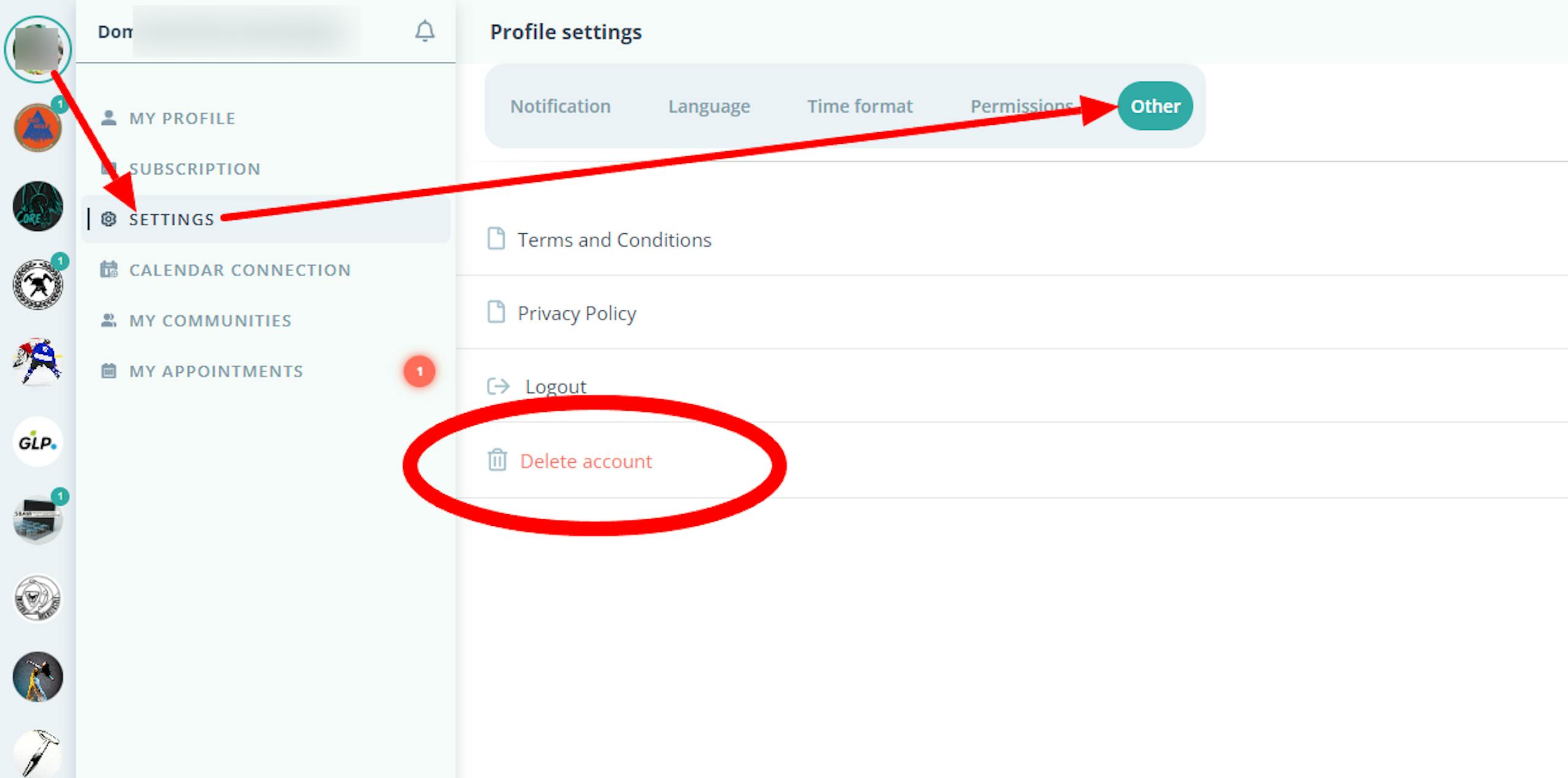
1. Log in: web.gumb.app/profile/settings

2. Click your profile picture in the top left

3. Open Settings

4. Scroll to "Other" → "Delete Account"

5. Confirm the deletion


🍎 iOS

1. Open the Gumb app

2. Tap "More" in the bottom right

3. Go to "My Settings" → Other

4. Select "Delete Account" and confirm


đŸ€– Android

1. Open the Gumb app

2. Tap "More" in the bottom right

3. Go to "My Settings" → Other

4. Select "Delete Account" and confirm


❓ Frequently Asked Questions

Can I reactivate my account?

No. Once deleted, reactivation is not possible. However, you can create a new account at any time.


What happens to my subscription? (Applies to owner accounts only)

Your subscription must be canceled separately under Web → Profile → Subscription. Deleting your account alone does not end active payments.


How long does the deletion take?

Your account is deleted immediately.


I can't log in - how do I delete my account anyway?

Use our Contact Form or email us at support@gumb.app. We'll take care of the deletion manually for you.


Still Have Questions?

For help - especially with transferring Community ownership - use our Contact Form. Thanks for being part of Gumb. đŸ™đŸŒ


Open Contact Form →