
Comparison · Updated 2 October 2026
Gumb vs. WhatsApp
Many clubs and teams organize themselves in WhatsApp groups. It is free and everyone has the app, but events easily get lost in the chat. Gumb puts every group into one shared calendar, with RSVP deadlines, reminders, attendance and shift scheduling. Here is the side-by-side comparison, with sources.
18:00 - 19:30
14:00 - 17:30
You plan. Everyone answers.
18:00 - 19:30
14:00 - 17:30
18:00 - 19:30
19:00 - 21:30
18:00 - 19:30
18:00 - 19:30
14:00 - 17:30
Features compared
WhatsApp is free. But professional scheduling and communication need features built for the job. Gumb has more than 100 of them.
Source: WhatsApp Help Center
| For your planning | Gumb | |
|---|---|---|
| ChatDirect messages and chat rooms for groups | Yes | Yes |
| Schedule per team and groupEvery group with its own calendar, plus one view of everything | Yes | Events in the group chat |
| Calendar sync for everyoneEvery member syncs their events with their own calendar | Google, Apple, Outlook | Not stated |
| RSVP deadlinesUntil when people can say yes or no | Yes | Not stated |
| Automatic remindersTo everyone who hasn't answered yet | Yes | Only when the event starts |
| Planned absencesEnter a vacation once, every event is marked | Yes | Not stated |
| Roles and permissionsWho creates events, who only answers | Yes | Admins only |
| Filter messages by answerFor example, only to everyone who said yes | Yes | Not stated |
| Analyze attendanceStatistics per person, export to Excel, CSV and PDF | Yes | Only the chat history as a text file |
Why teams and organizations switch to Gumb
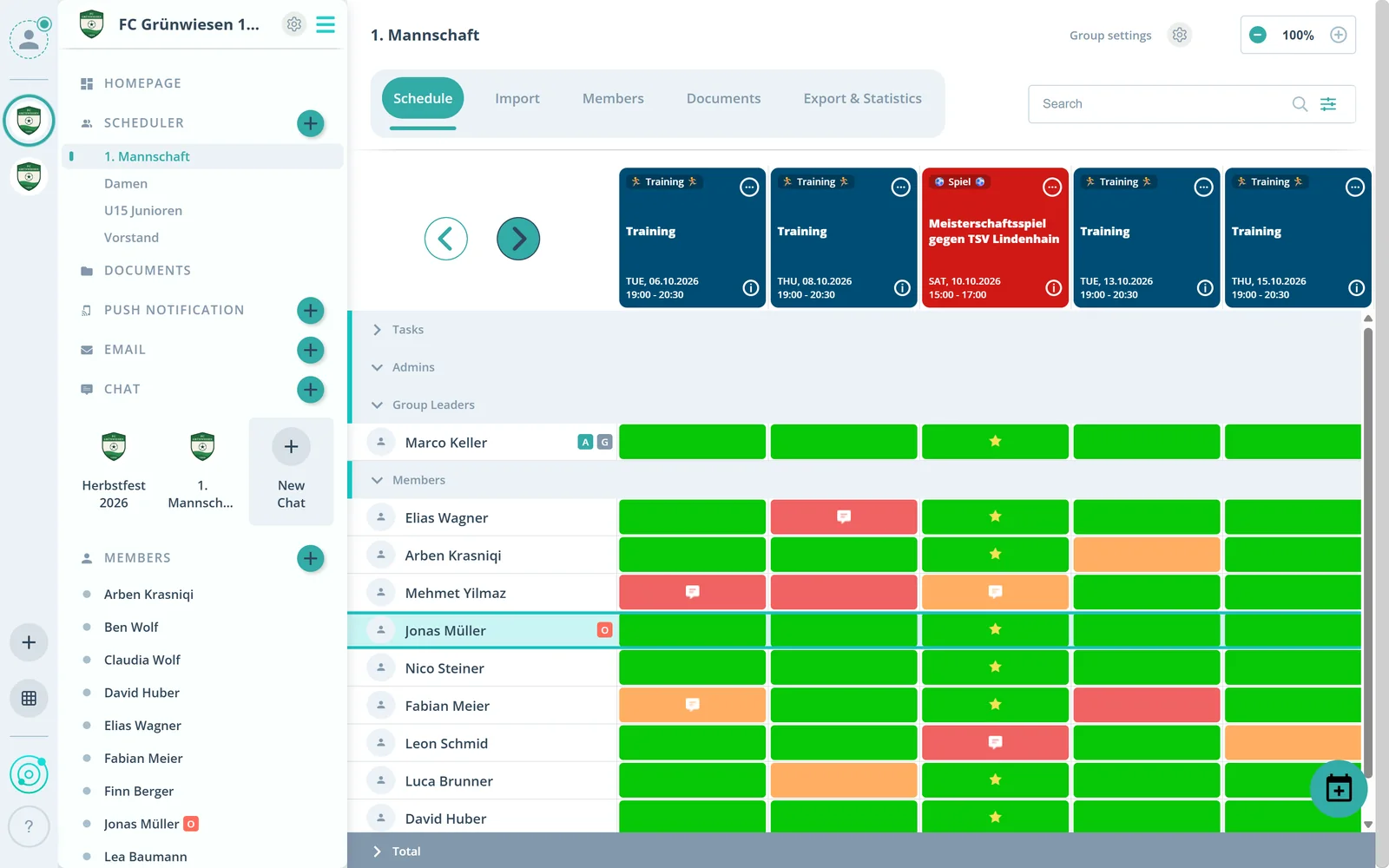
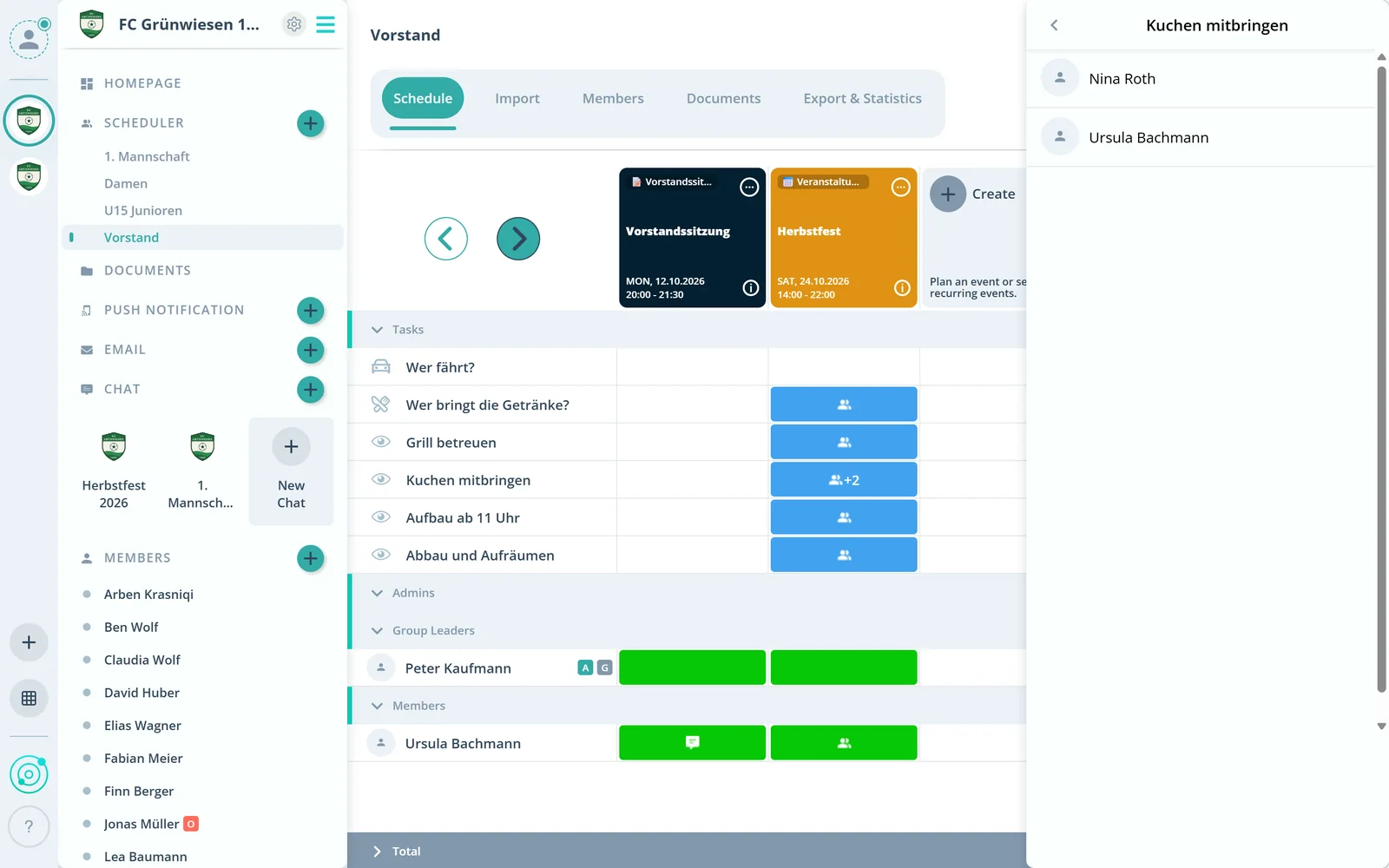

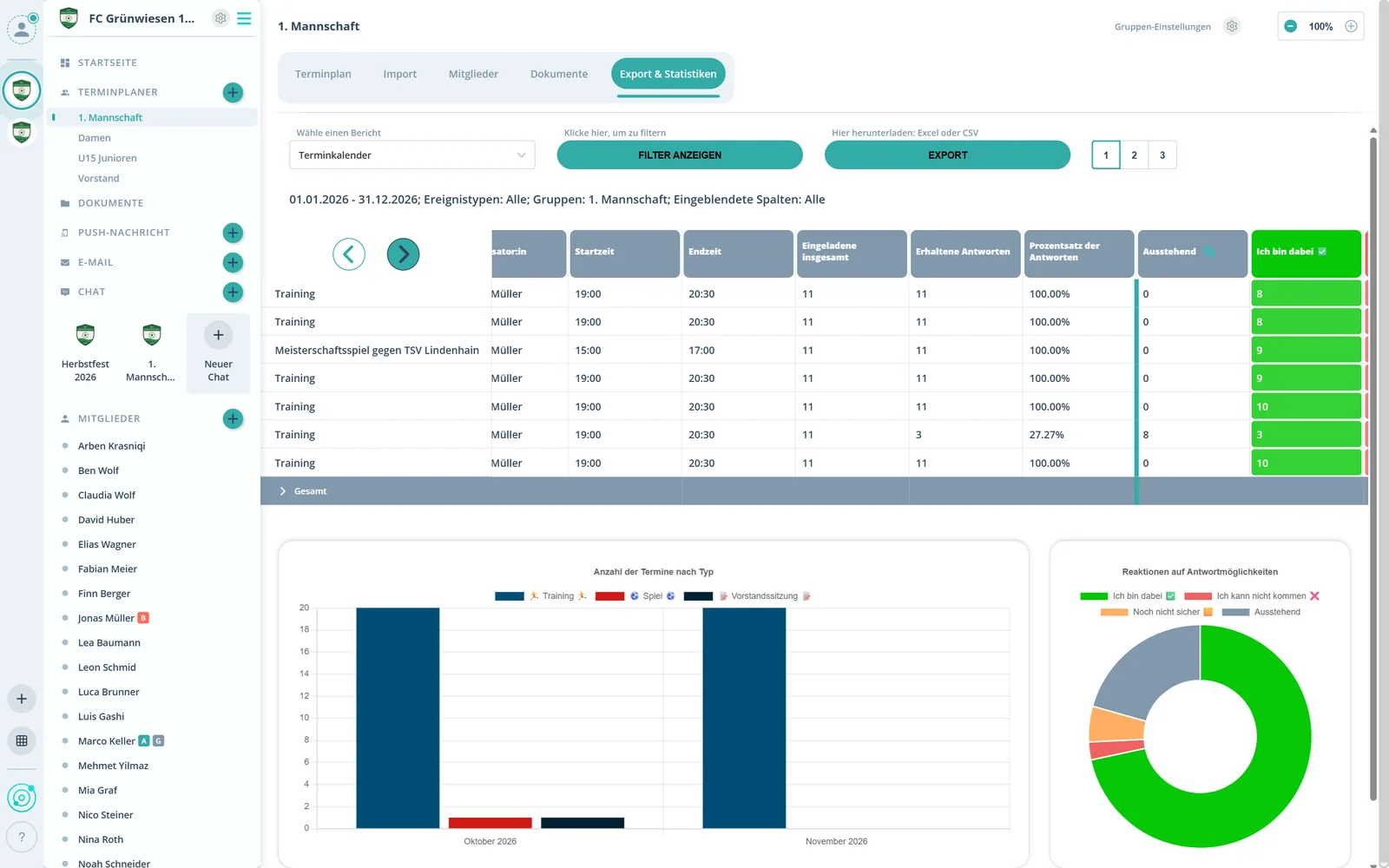
Gumb or WhatsApp: Which fits you?
Gumb fits you if …
- you want to organize your events professionally
- you want an overview of every event, especially recurring ones
- you want to see who is in and who is out at a glance
- you want to set RSVP deadlines and send reminders automatically
WhatsApp is enough if …
- you mainly want to chat privately
- you don't need deadlines, reminders or statistics
- you only plan the odd one-off event
Many combine Gumb and WhatsApp: Gumb for organizing, WhatsApp for private chats. Gumb has one-on-one chats and chat rooms too.
Switch to Gumb in 3 steps
During the trial you can run Gumb alongside your WhatsApp groups.
- 1
Set up your organization
Choose your teams, notifications and colors. Usually done professionally in 1 to 2 hours.
- 2
Plan your events
Create single events and series, or bring them over with the import.
- 3
Invite your members
Add them in advance and invite them by link or email. Everyone sees their events right away.
All features in detail
Source: WhatsApp Help Center, as of October 2, 2026
| Feature | Gumb | |
|---|---|---|
| Who it is for | Any kind of groupclubs, businesses, churches, rescue services, music, hobbies | Friends and familycommunities, e.g. for clubs |
| Billing | Per organizationfree for members | Freeoptional subscriptions, e.g. to remove ads in Status and Channels |
| Free option | 2 months with all featuresno credit card, no automatic renewal | Freedata charges may apply |
| Entry price | Pro: $149 per year or $16 per month | Freeoptional ad-free subscription for Status and Channels |
| Platforms | iOS, Android and web | Android, iPhone, web, Windows and Mac |
| Events for practices, rehearsals, meetings and shifts | Yes | Events in the group chatdate, time, location |
| One shared calendar for all groups | Yes | List of upcoming events per community |
| Events per group | Yes | Yes |
| Event templates and custom event types | Yes | Not stated |
| RSVP deadlines | Yes | Not stated |
| Automatic reminders | Yes | Only a notification when the event starts |
| Planned absences | Yes | Not stated |
| Shift and duty scheduling | Yes | Not stated |
| Import events | Yes | Not stated |
| Calendar sync | Google, Apple and Outlook | Not stated |
| Share events via WhatsApp or email | Yes | Only in its own chatcannot be forwarded |
| Automatic time zones | Yes | Not stated |
| One-click RSVP | Yes | Going, Maybe or Can’t go |
| Comment on an RSVP | Yes | Not stated |
| Live attendance overview | Yes | Track RSVPs |
| Guests at events | Yes | RSVP with a guest |
| Availability checks | Yes | Polls in the chatup to 12 options |
| Attendance statistics | Yes | Not stated |
| Export | Excel, CSV and PDF | Only the chat history as a text file |
| Team chat | Yes | Yes |
| Direct messages | Yes | Yes |
| Comments right on the event | Yes | Not stated |
| Push and email notifications | Yes | Pushemail not stated |
| Emails with attachments to selected groups | Yes | Not stated |
| Roles and permissions | In every plan | Group and community admins |
| Parent and child accounts | Parents manage their children’s accounts | Not stated |
| Departments | Yes | Community with topic groups |
| One login for several groups | Yes | Not stated |
| Move members to new teams or seasons in one click | Member swap matrixPremium | Not stated |
| Central management of several teams | In Premium | Community with up to 100 groups |
| Registration forms | Yes | Not stated |
| Automations | Yes | Not stated |
| Export member lists | Yes | Not stated |
| Sign in with Apple, Google or Facebook | Yes | Sign-up with a phone number |
| Tasks right on the event | Yes | Not stated |
| Files and documents | 2 GB in Proup to 15 GB in Premium | Share documents up to 2 GB in the chat |
FAQ: Gumb vs. WhatsApp
Which app can I use instead of WhatsApp to schedule events?
Gumb is a scheduling app that clubs, teams, businesses and organizations use instead of or alongside WhatsApp groups. Every event sits in one calendar, members RSVP with one click, and Gumb sends reminders automatically. Gumb runs on iOS, Android and the web and is free for members.
Which app works for scheduling shifts and duties?
Gumb. You plan shifts and duties in Gumb just like events, in a club as well as in a business: employees and volunteers sign up themselves or get assigned, and everyone sees at a glance who is on when. Reminders and RSVP deadlines work for shifts too.
Does Gumb work for businesses and companies?
Yes. Businesses and companies use Gumb wherever schedules, assignments and RSVPs matter, for example for shifts, duties, trainings, meetings or company events. Departments, roles and permissions keep teams cleanly apart, and attendance can be exported to Excel or CSV. A WhatsApp group runs on private phone numbers and a chat history where RSVPs get lost.
What is the difference between Gumb and a WhatsApp group?
WhatsApp is a messenger, Gumb is a scheduling app for clubs, businesses, teams and organizations. In a WhatsApp group, single events sit in the chat history. Gumb keeps every event of every group in one calendar, with RSVP deadlines, automatic reminders, planned absences, attendance statistics and exports. Gumb has one-on-one chats and chat rooms too.
Why isn't a WhatsApp group enough to schedule a club or a business?
Because WhatsApp events have clear limits according to the WhatsApp Help Center: only one person can create and edit an event, new members can't see events created before they joined, and events can't be forwarded to another chat. In Gumb, several admins and group leaders plan together, and new members see all upcoming events of their groups right away.
Can you create recurring events in WhatsApp?
The official WhatsApp Help Center only describes single events and does not mention a series feature. For weekly practices, rehearsals, meetings or shifts, you create every event one by one in WhatsApp. In Gumb, you create recurring events as a series, with your own event types, colors and defaults.
Does WhatsApp send automatic event reminders?
Only once: according to the WhatsApp Help Center, people who answer Going or Maybe get a notification when the event starts. Anyone who hasn't answered gets no reminder. Gumb sends up to 2 reminders per event by push, email and in the app, and works with RSVP deadlines.
Can WhatsApp events sync with a calendar?
The official WhatsApp Help Center does not describe calendar sync for events. In Gumb, every member connects their own calendar with Google, Apple or Outlook, and all events show up there automatically.
How many members fit in a WhatsApp group?
According to the WhatsApp Help Center, groups can have up to 1,024 members. A community brings together up to 100 groups and up to 2,000 members in total, and only community admins can send announcements.
Do members need a phone number for Gumb?
No. WhatsApp groups run on every member's phone number. In Gumb, you sign up with an email address or with Apple, Google or Facebook. Managed accounts, for example for children or seniors, don't even need an email address. Gumb sends no SMS codes. A phone number in the profile is optional, and every member decides for themselves. Organizations get a data processing agreement (DPA) under the GDPR.
How much does Gumb cost compared to WhatsApp?
WhatsApp is free; there are optional subscriptions, for example to remove ads in Status and Channels. Gumb Pro costs $149 per year or $16 per month and includes 20 group planners and 100 members in one organization. Premium plans for more groups and members start at $269 per year. Gumb is free for members; only the organization pays.
When is a WhatsApp group enough?
A WhatsApp group is enough if you mainly want to chat privately; if you don't need deadlines, reminders or statistics; or if you only plan the odd one-off event. Gumb fits you if you want to organize your events professionally; if you want an overview of every event, especially recurring ones; if you want to see who is in and who is out at a glance; or if you want to set RSVP deadlines and send reminders automatically.
Which platforms does WhatsApp run on?
WhatsApp: Android, iPhone, web, Windows and Mac. Gumb: iOS, Android and web.
Can you use Gumb and WhatsApp together?
Yes, many combine both: Gumb for organizing, WhatsApp for private chats. You share events straight to WhatsApp and post the Gumb invite link in your existing group.
How do you switch from WhatsApp groups to Gumb?
In three steps: set up your organization with teams, notifications and colors, usually in 1 to 2 hours. Then plan single events and series, or import them. Finally, add your members in advance and invite them by link or email, so everyone sees their events right away. During the 2 free months you can run Gumb alongside WhatsApp.
You plan. Everyone answers.
Start today with Gumb.
Try it free for 2 months, with no credit card and no automatic renewal.
Sources and date
All WhatsApp group details come from whatsapp.com and the WhatsApp Help Center, retrieved on 2 October 2026. They may have changed since. “Not stated” means we did not find the feature in these sources. WhatsApp is a trademark of its respective owner. Found a mistake? Let us know and we will correct it.
- WhatsApp: groups
- WhatsApp help: events in groups
- WhatsApp help: respond to events
- WhatsApp help: events in communities
- WhatsApp help: group members
- WhatsApp help: create a community
- WhatsApp help: community examples
- WhatsApp help: group admin settings
- WhatsApp help: polls
- WhatsApp help: export a chat
- WhatsApp help: send media
- WhatsApp help: supported operating systems
- WhatsApp help: ad-free subscription
- WhatsApp help: WhatsApp Plus
- Gumb: pricing and full feature comparison
- Gumb: features