
Hobby & community
The scheduling app for your group
Meetups, trips and club nights in one place. Everyone answers with one tap, and you see who is coming.
- iOS, Android & web
- No feature upgrades needed
- No credit card needed



Hobby clubs that use Gumb
 semper fidelis Harley-Davidson
 Modellflugverein Schwadernau-Scheuren (FMVSS)
 Dampflok-Depot Full
 Schwaben-Slot e.V.
 Sauerländer Kleinbahn
 VMS Vereinigte Motorrad Staffeln
 Mantrailing Hundelicht
 Spessart Racer e.V.
In short
Gumb is a scheduling app for groups that meet regularly: cooking clubs, car clubs, hiking groups, esports teams and volunteers. You create recurring meetups once as a series, everyone answers yes or no with one tap, and Gumb reminds only those who have not answered. Tasks like drinks, shopping or driving are shared per meetup, and a poll in the planner finds a new date. You try it free for 2 months, then only the person who runs the group pays. Members never pay.
For every group
What do you organize?
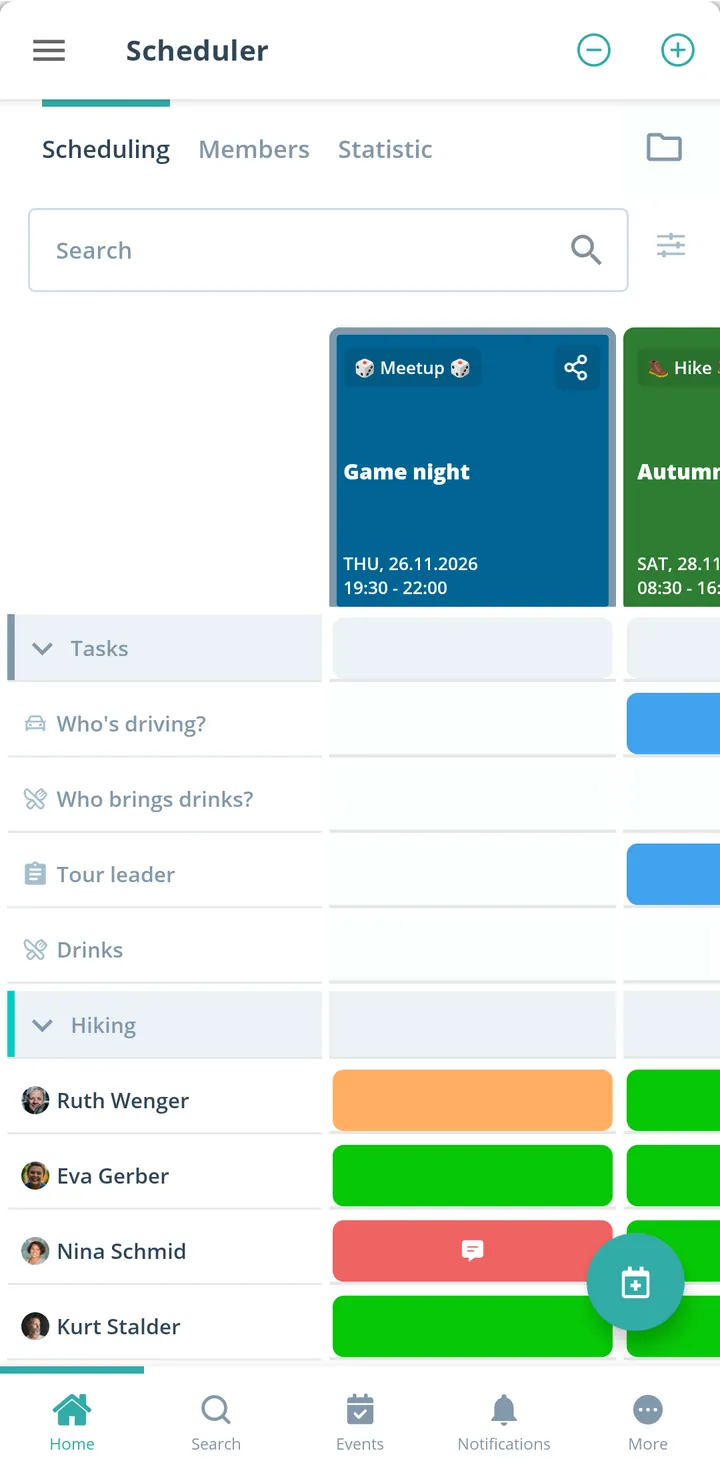
Create a meetup, repeat it as a series, add tasks. This is how it looks for you.
Every other Thursday, 6:30 PM
Cooking night
- Thu 11/129/12
- Thu 11/267/12
- Thu 12/1010/12
- Thu 1/144/12
Yes answers from 12 members
Tasks
- ShoppingSabine
- WineThomas
Who cooks, who shops: by the evening, it is all shared.
All names and dates are examples.
Reach exactly the right group
Single members, one group or everyone.The message only reaches the people it concerns.
 Sent to Nina
- Hiking
- Nina
- Ruth
- Mountain tours
- Simon
- Jonas
- Seniors
- Kurt
- Bruno
 Gumbnow🥾 New hikeSaturday, 9:00 AM, meet at the station.
A party with helpers
From the plan to the party
Autumn party, trip or club night: this is how an event fills up, step by step.
3 weeks before
Create the event, add tasks
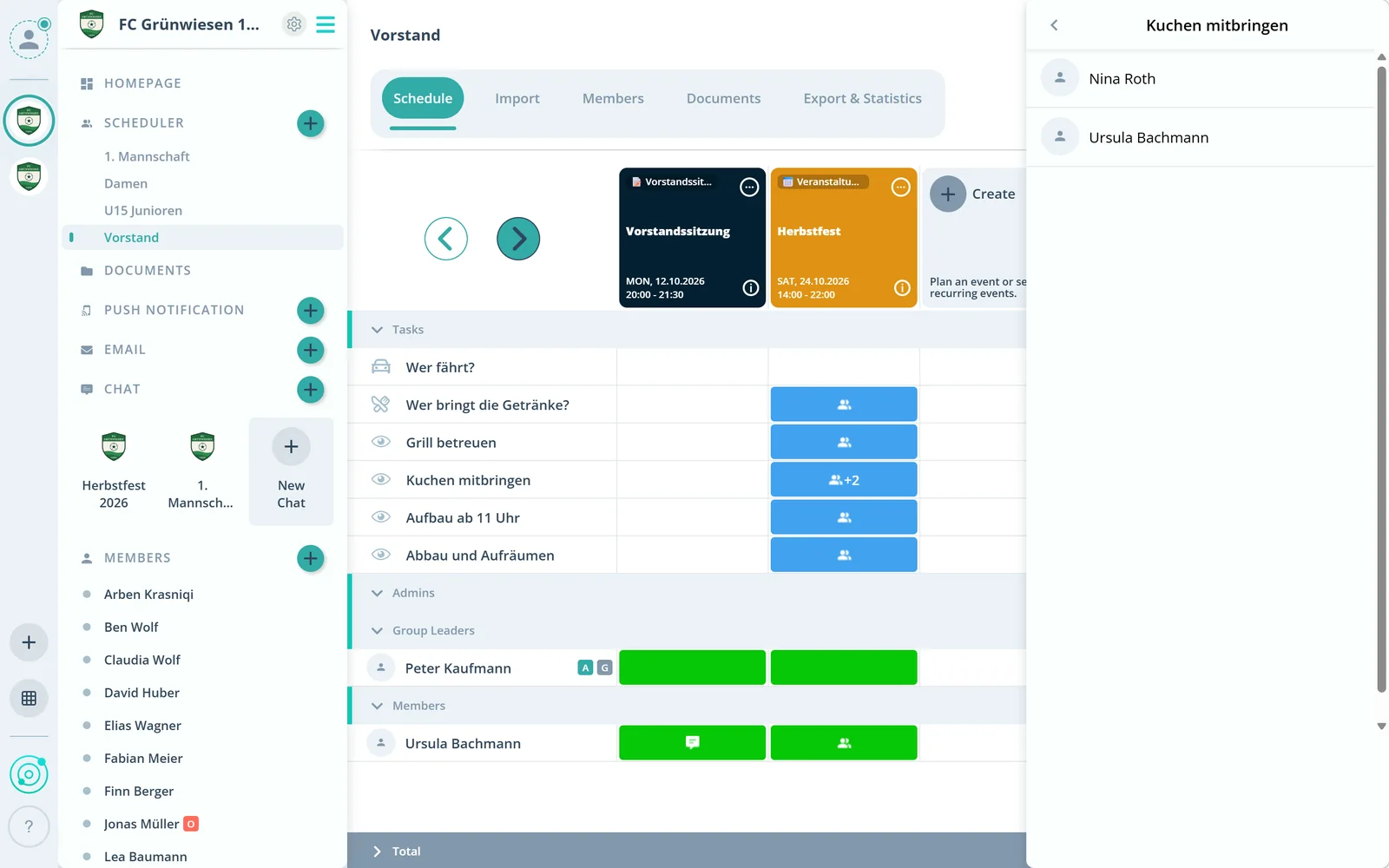
Drinks, grill, cake, setup: create the tasks once and switch them on for the party.
2 weeks before
Invite everyone
One email to the whole group, linked to the party. Answering takes one tap.

The week before
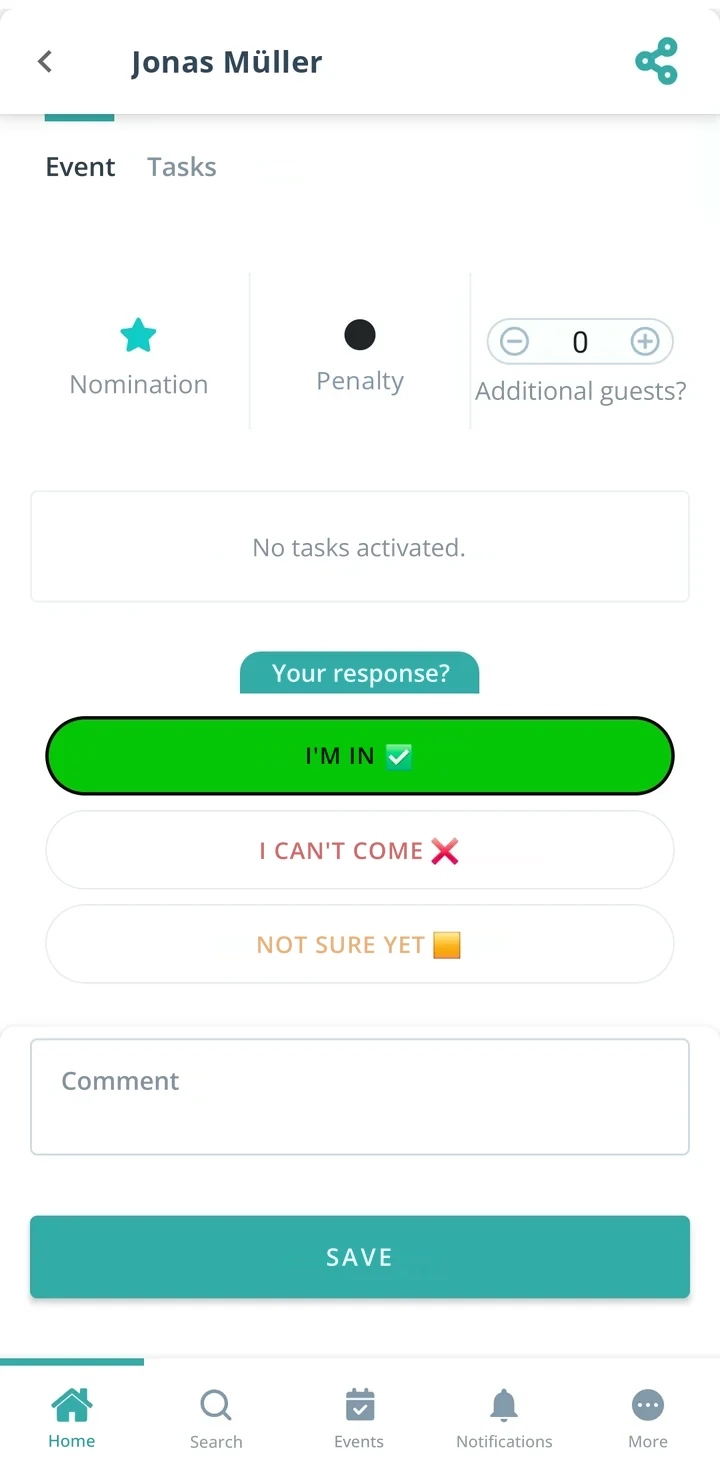
One tap to answer
Everyone answers in the app and picks a task. Nobody keeps a list.
The day before18:00
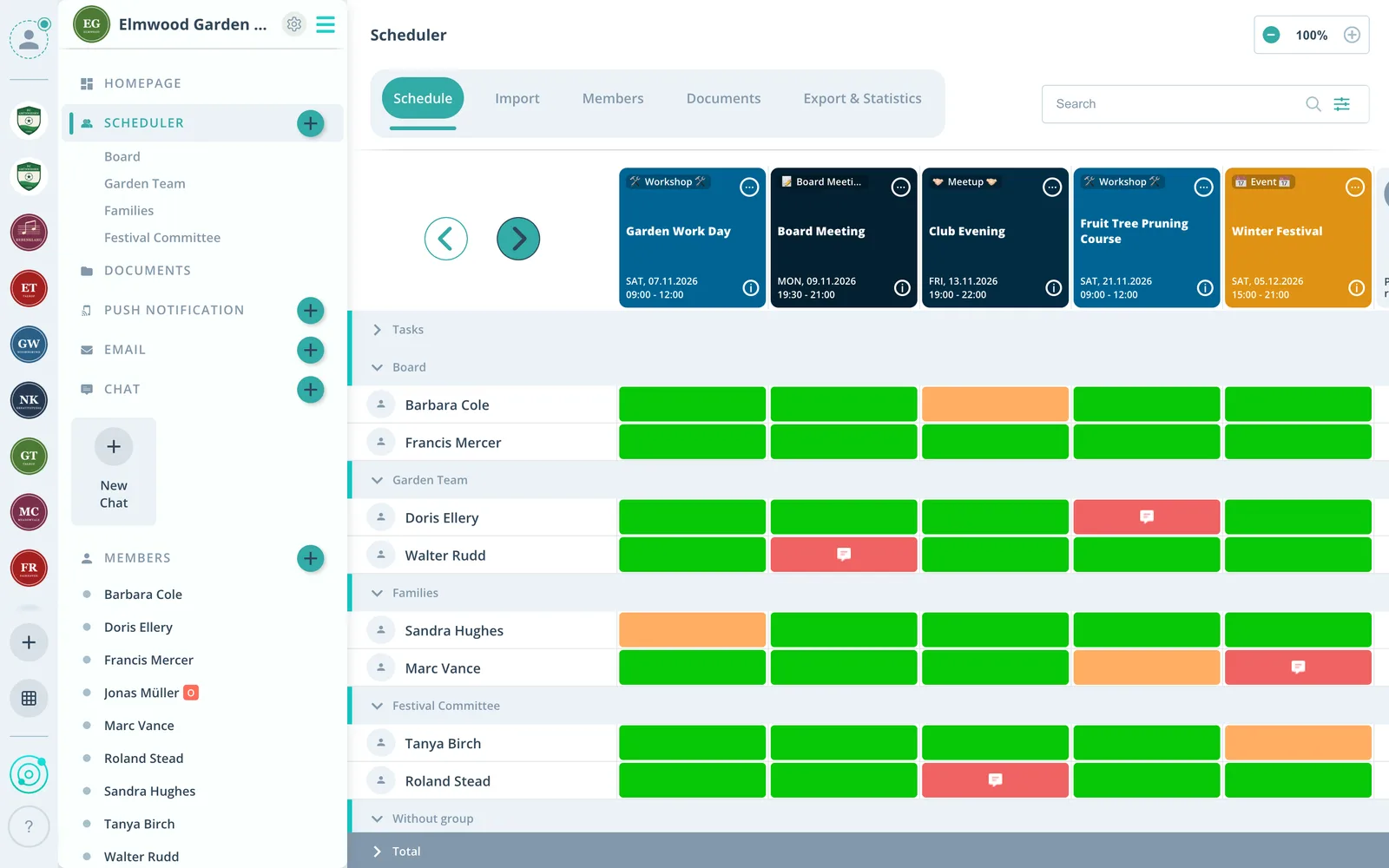
You see who is coming
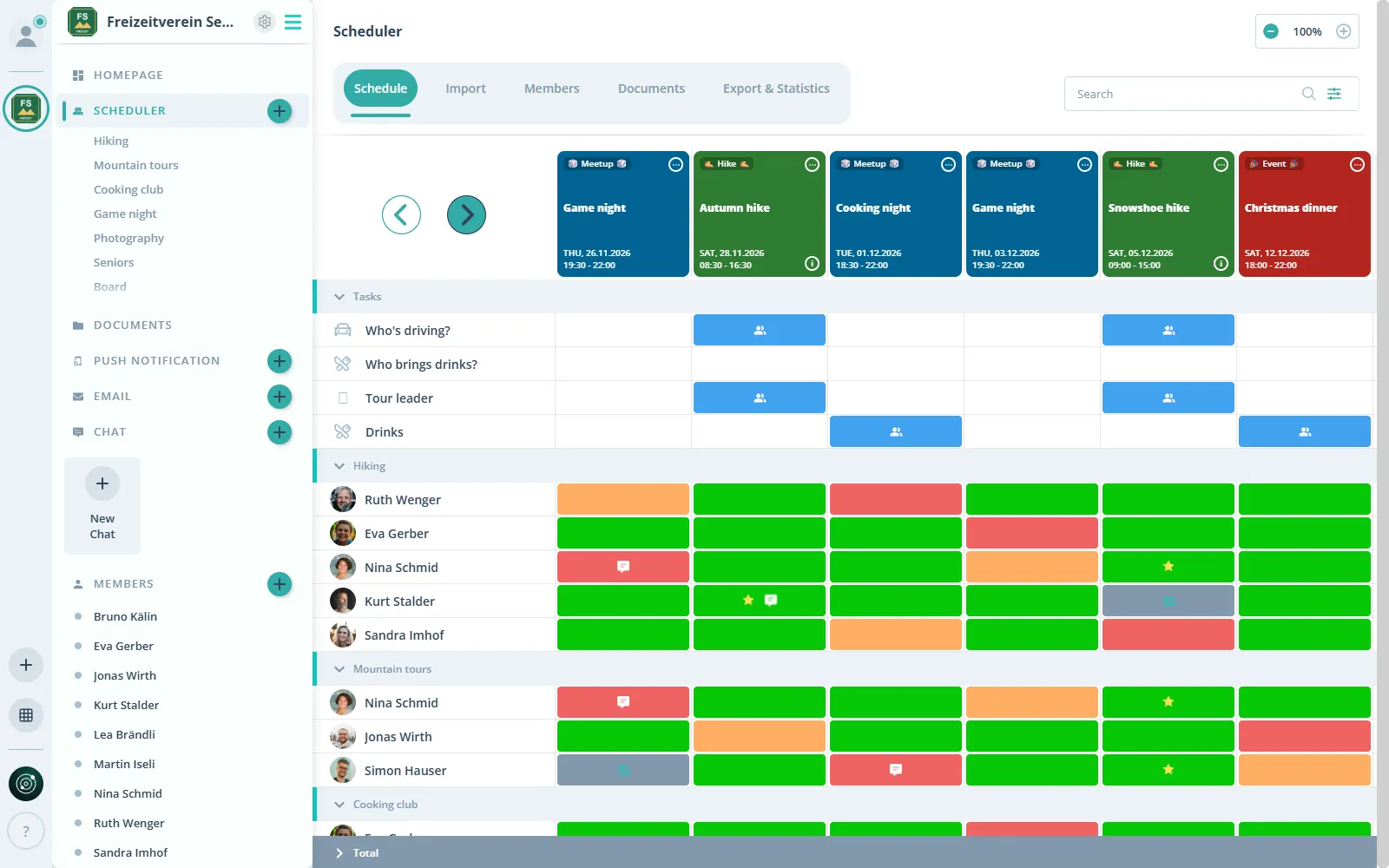
Green is coming, red is out, gray has not answered. Only the open ones get the reminder.
One club, many groups
Each group plans on its own, with its own meetups and members.
Members can be part of several groups and clubs.
- CCCooking club
- Cooking nights
- Grill team
- LCLakeview Leisure Club
- Hiking
- Mountain tours
- Seniors
- CCCar club
- Drives
- Workshop
And every member sees it all at a glance.
Whatever the group or club, every meetup lands in one list, in date order.
What's in it for everyone in the group
Meetups, trips, events and tasks like the cake for the party.
All in one place, on every device.
In their own calendar
Every event shows up in their personal calendar automatically.
Accept or decline with one tap
Comments, chat and files, right at the event.
🟢 Going🔴 Not going🎂 Cake🍺 BarOn every device
On phone, tablet or computer, always the same events.
iPhoneAndroidWeb
For you as an organizerNo more asking around in the group chat who's coming.
Start small or set up big
One group or the whole club, you choose the setup that fits how you work.
Start small
One community for the whole club
- Each group plans in its own group planner.
- You set event types, answers, tasks and reminders once for everyone.
- Admins see every group planner, even without being in the group.
Up to 20 groups per community, all in one plan.
Set up big
One community per club
- Each club has its own event types and colors.
- Its own answer options and its own event reminders.
- Each club sets up Gumb the way it works.
Premium covers 2 to 30 communities in one plan.
Rule of thumb
If every group follows the same routines, one community is enough. If each club wants its own rules, use separate communities.
You can start with one community and add more later.
Groups and communitiesComparison
WhatsApp, Doodle, Meetup or Gumb
What groups plan with today, and what is missing when you meet every week.
| Task | Whats | Doodle | Meetup | Gumb |
|---|---|---|---|---|
| Meetups as a series, no new poll | No | No | Yes | Yes |
| One-tap RSVP, visible to all | Partly or by hand | Yes | Yes | Yes |
| Reminders only to those without an answer | No | Partly or by hand | Partly or by hand | Yes |
| Tasks per meetup, like drinks | Partly or by hand | No | No | Yes |
| Find a date, by poll | Partly or by hand | Yes | No | Yes |
| Chat without phone numbers | No | No | Yes | Yes |
| Bring guests without an account | No | No | Yes | Yes |
| Who came how often, as Excel | No | Partly or by hand | Partly or by hand | Yes |
- Yes
- Partly or by hand
- No
- WhatsApp groupSomeone still counts the thumbs.
- DoodleGood for a single date.
- MeetupMade to find new people.
As of November 2026, compared with the usual standard features.
Choose your group
A dedicated page for every group, with examples from everyday club life.





One price for the whole group
You pay per group, not per person. Members never pay.
Gumb Pro, every feature
149 CHFa year
for up to 100 members
Same price for:
- 12 members
- 25 members
- 50 members
- 100 members
About 6 francs per person a year.
Free tools cost nothing. Instead, someone counts the answers by hand every week.
Several groups or more than 100 members? Premium comes in tiers. Current prices in your currency are on the pricing page.
See all pricesWhat hobby groups say about Gumb
4.7/54.7 out of 5 stars271 ratings across both platforms25K+ users
Great app for scheduling. Very clear, reliable and easy to use.
With all my hobbies I always had a big muddle. With the Gumb app I can see who is coming when, and I can also ask why not... The layout is very user-friendly and modern. I think the app is very good and recommend it.
We tried out various apps in our club and Gumb covers our needs best! If you have questions, support helps right away. The app is constantly being improved and new, very useful features keep being added.
Reviews translated from German.
Group scheduling app: your questions
Is Gumb a free group scheduling app?
You try Gumb free for 2 months, with every feature and no credit card. The trial ends on its own. After that, only the person who runs the group pays: Gumb Pro costs 149 francs a year for up to 100 members. Members never pay.
What does Gumb cost for members?
Nothing. Members and admins use Gumb for free, no matter how many groups they are in. Only the group's subscription is paid.
Does everyone have to install the app?
No. Gumb is an app for iPhone and Android and runs in the browser at web.gumb.app. Anyone who does not want the app answers in the browser. Events can also show up in Google, Apple or Outlook Calendar.
Is Gumb an alternative to Doodle?
Yes, for groups that meet regularly. Doodle finds one date. In Gumb you create recurring meetups once as a series, and everyone answers each event with one tap. For a new date there is a poll right in the planner, with one tile per possible day.
Is Gumb a WhatsApp alternative for clubs?
For organizing, yes. Instead of thumbs in the chat, everyone answers yes or no with one tap, and you see the count right away. Gumb has a chat without phone numbers and chat rooms for selected people. Many groups keep WhatsApp for small talk and plan in Gumb.
Will our members actually use Gumb?
Answering is one tap, no form. Anyone who does not react gets a reminder on their own, up to two before each event. You share the join link once in your current group chat, everyone joins on their own, and you only approve.
Do members need a phone number?
No. Chat and push messages work without a phone number. A number in the profile is optional.
Can partners or friends come along?
Yes. When you answer, you add extra guests, like +1 or +2. Guests need no account of their own and count in the total.
How do we share tasks like drinks or driving?
You create tasks once, like Who drives? or Who brings drinks?, and switch them on per meetup. Members take a task with their answer, or you assign it directly.
Which groups is Gumb for?
For cooking clubs, car clubs, hiking groups, esports teams, volunteers and any community that meets regularly. You run several groups with one subscription, each with its own settings.
One community for the whole club or one per group?
If every group follows the same routines, one community with up to 20 groups is enough. If a group, such as the cooking club, needs its own event types, answer options or reminders, it gets its own community. Premium covers 2 to 30 communities in one plan.
Ready for the next meetup?
Try Gumb free for 2 months with your group. Every feature, no credit card, and the trial ends on its own.