
For Members
Outlook Connection 📅
Connect Gumb to your Outlook calendar and your Gumb events show up there automatically. You copy an iCal link per community from Gumb and subscribe to it in Outlook.
How do I get the iCal link from Gumb?
- On a computer, open Calendar connection in your profile.
- Click Connect Apple & Outlook (iCal) if it isn't connected yet.
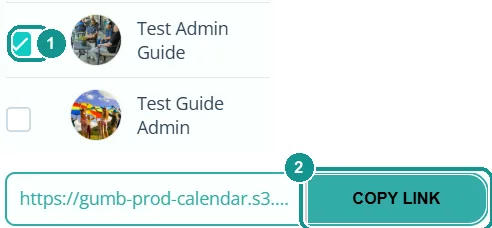
- Check the community whose events you want to see (1). The checkbox saves right away and the iCal link appears.
- Click Copy link (2).
Each community has its own link. For several communities, subscribe to each link separately.
How do I subscribe in Outlook?
Outlook on the web and new Outlook for Windows
- Open your calendar and click Add calendar.
- Choose Subscribe from web, paste the link and name the calendar.
- Click Import.
Classic Outlook for Windows
- Open your calendar and click Add Calendar > From Internet.
- Paste the link and click OK. Confirm with Yes.
Outlook for Mac and mobile: Subscribe to the link in Outlook on the web. The calendar then shows up wherever you're signed in with the same Microsoft account.
What happens after subscribing?
- One calendar per community: Each link shows up as its own calendar.
- Refreshed automatically: New and changed events arrive with Outlook's next refresh. Each event has a link to respond in Gumb.
- One way only: Changes in Outlook don't flow back to Gumb.
What if no events show up in Outlook?
- Community not checked: Without the checkbox there's no link, and Gumb removes the events from the subscription. Check the community under Calendar connection.
- Wrong link: Each community has its own link. Copy it again with Copy link and subscribe again.
- Calendar hidden: Check the subscribed calendar in the calendar list on the left.
- Old subscription: Remove the calendar in Outlook and subscribe to the link again.
Why don't I see a change yet?
Microsoft decides how often Outlook reloads subscribed calendars. It can take a few hours. If you're removed from a community, the sync ends and its events disappear from your calendar.
How do I remove the calendar?
Uncheck the community in Gumb or click Disconnect. Gumb then removes the events, but the empty calendar stays visible. Delete it in your calendar app too:
- Outlook: Right-click the calendar > Remove.