
Cooking club, Cooking night, Taste
The app for cooking clubs and gourmet groups
Plan cooking nights, tastings and trips, see RSVPs in real time and track attendance automatically. For organizers, members and the board, without the group chat chaos.
- iOS, Android & web
- No feature upgrades needed
- No credit card needed



In short
Gumb is an app for cooking clubs and gourmet groups. Organizers plan cooking nights, tastings and trips as events with a response deadline, members sign up and list allergies or intolerances as a required comment. Ingredients and courses become tasks on the cooking night, recipes sit as files on the event, and with a poll event the club picks the theme for the next evening.
From shopping list chaos to a great cooking night
What costs organizers time before every cooking night, and how Gumb fixes it.
Without Gumb: Who brings which ingredients is sorted in long chat threads.
With Gumb: Ingredients and courses are tasks on the cooking night, with names next to them.
Without Gumb: You learn about allergies when the menu is already set.
With Gumb: A comment can be required with the sign-up, for example for allergies.
Without Gumb: Nobody can find last time's recipe.
With Gumb: Recipes sit as files on the event or in the club folder.
Without Gumb: The next theme gets debated forever.
With Gumb: A poll event with your own answers shows right away which theme wins.
Cooking nights, tastings and trips under control
Sign-ups, ingredients and recipes per event, in the app and in the browser.
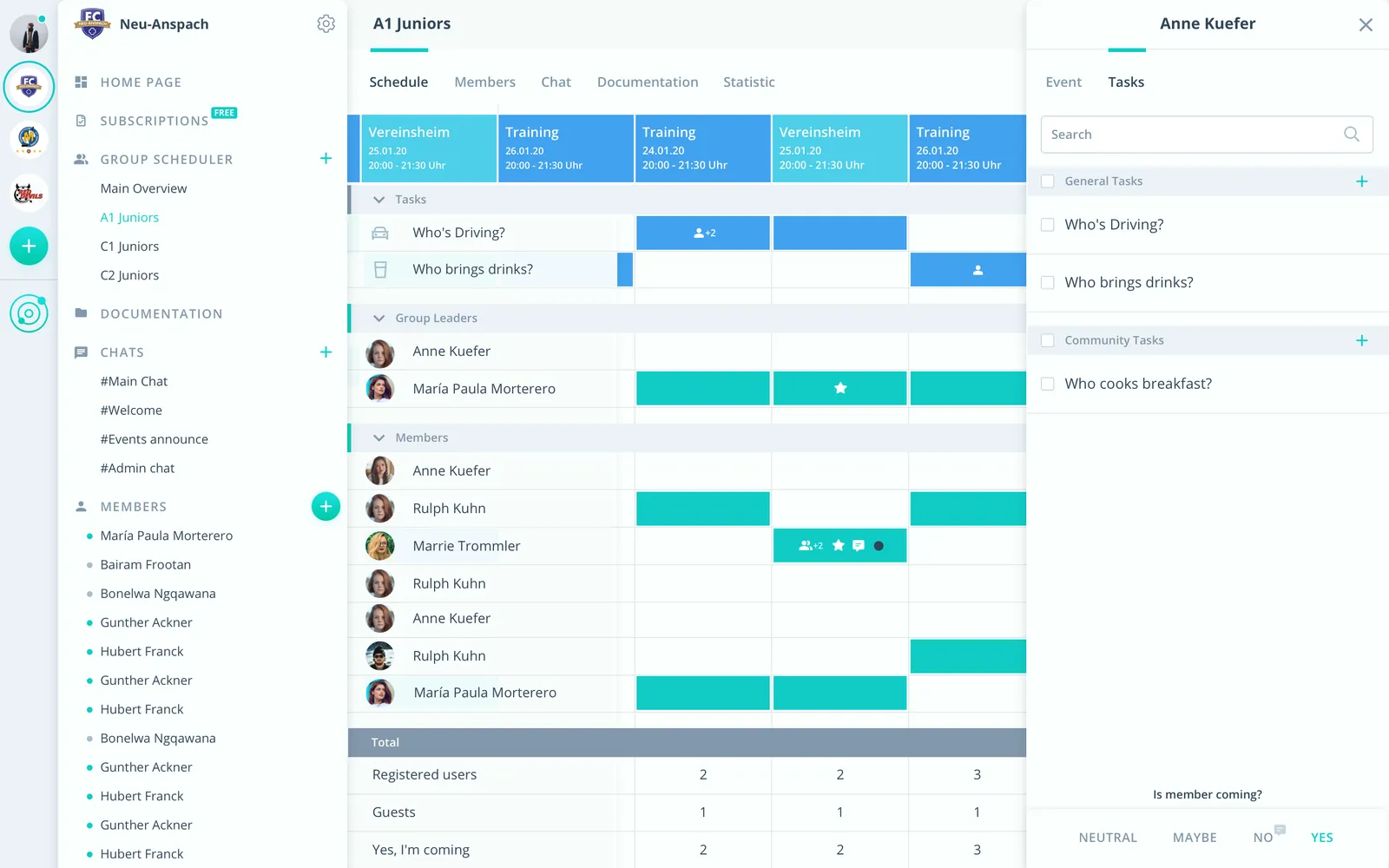
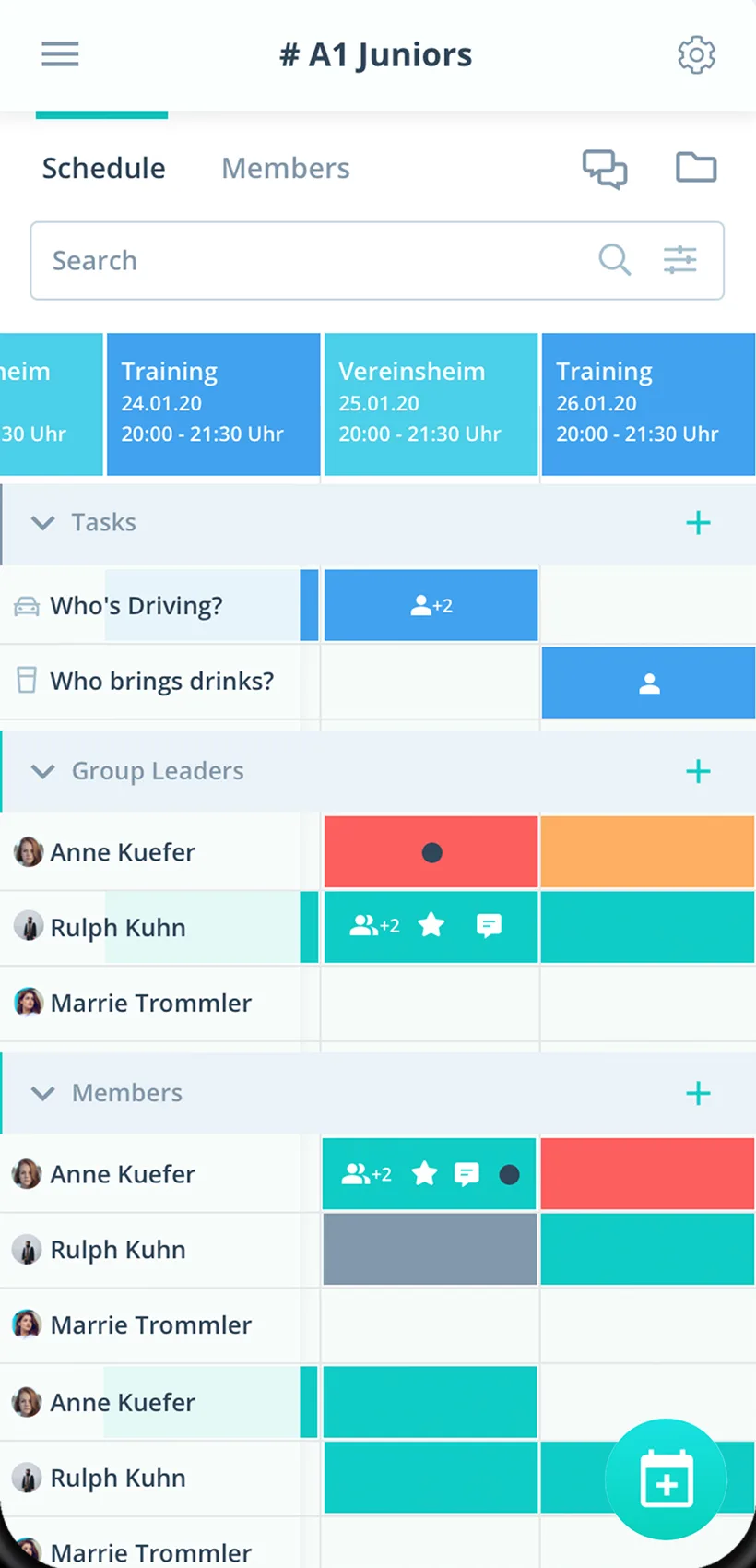
Ingredients as tasks
Starter, main, dessert or single ingredients handed out on the event.
Allergies with the sign-up
With a required comment on the yes answer you know every intolerance.
Recipes on the event
The evening's recipe stays on the event, available to everyone.
Everything your cooking club needs
For organizers, members and the board. From the cooking night to the wine trip.
Food calendar
Cooking nights, tastings, classes and trips in one calendar.
Sign-up with allergies
Members sign up, with allergies as a required comment if you like.
Deadline before shopping
Plan until the deadline, then shop for the right number.
Ingredients and courses
Hand out starter, main, dessert or ingredients as tasks.
A reminder before the cooking night
Up to two reminders before the cooking night, by push notification and email.
Menu questions
Sort out menu, shopping and meeting point right on the event.
Collect recipes
Store recipes and wine lists on the event or in the club folder.
Cooking teams and groups
Every cooking team with its own group scheduler.
Rights for organizers
Admins manage the club, organizers schedule as group leaders.
How your cooking club gets started
From the first cooking night to a growing recipe collection.
- 1
Set up your cooking club
Create cooking teams as groups and invite members by link.
- 2
Enter a cooking night
Add the event with a response deadline, ingredients as tasks and the recipe as a file.
- 3
Go shopping
After the deadline, know how many people to plan for and which allergies.
For everyone in the cooking club
Organizers
- Know allergies without asking around
- Share out ingredients fairly
- Pick the theme by poll
Members
- Sign up for the cooking night with one click
- Recipes always at hand
- Cooking nights in your own calendar if you like
Board
- Every cooking team on one platform
- Trips with a response deadline
- Members exported as CSV
What gourmet clubs and groups say
4.7/54.7 out of 5 stars271 ratings across both platforms25K+ users
Great app for scheduling. Very clear, reliable and easy to use.
Gumb
Great app!
Simple and clear to use, everything works perfectly.
Reviews translated from German.
Hobby clubs that use Gumb
 semper fidelis Harley-Davidson
 Modellflugverein Schwadernau-Scheuren (FMVSS)
 Dampflok-Depot Full
 Schwaben-Slot e.V.
 Sauerländer Kleinbahn
 VMS Vereinigte Motorrad Staffeln
 Mantrailing Hundelicht
 Spessart Racer e.V.
FAQ: the app for cooking clubs
How do I decide who brings which ingredients?
Create courses or single ingredients as tasks and turn them on for the cooking night. Members sign up themselves, or admins assign them. Everyone sees who brings what.
How do I ask about allergies and intolerances?
In the settings under "Answers" you make a comment mandatory for the yes answer. That way every member writes their allergies right with the sign-up.
Where do we collect our recipes?
Put recipes right on the cooking night's event or permanently under "General documents". Files can be up to 50 MB each.
How do we pick the theme for the next evening?
With an event type called "Poll". The answer options stand for the themes, and in the scheduler you see right away how people voted.
Can I set a deadline before shopping?
Yes. With the response deadline you know in time how many people you are shopping for.
Can several cooking teams plan separately?
Yes. Every cooking team gets its own group scheduler. Club events for everyone sit in the shared calendar.
Which app suits a cooking club?
Gumb suits cooking clubs that plan cooking nights as events. Members say yes or no with one click, you hand out tasks such as shopping or starter on the event, and recipes sit in the group folder.
What does Gumb cost for a cooking club?
You try Gumb free for 2 months, with every feature, no credit card and no automatic renewal. After that the Pro plan costs 149 Swiss francs a year for up to 100 members. Members never pay.
Ready for the next cooking night?
Try Gumb with your cooking club free for 2 months, with every feature, no credit card and no automatic renewal.