
For Subscribers
Payment Methods & Currencies 💳
You can pay for your Gumb subscription by card, SEPA Direct Debit, TWINT or invoice. Which methods you can choose depends on your currency, and your currency depends on the country of your billing address. All payments are processed securely by our payment provider, Stripe.
Which payment methods are there?
At checkout, you choose Pay now or Invoice.
Pay now: you're charged right away and then automatically at every renewal.
- In USD: credit or debit card (Visa, Mastercard), Apple Pay, Google Pay and Link
- In EUR: card, SEPA Direct Debit, EPS in Austria, Apple Pay, Google Pay and Link
- In CHF: card, TWINT, Apple Pay, Google Pay and Link
Apple Pay and Google Pay only show up on devices that support them. Link is Stripe's fast checkout.
Invoice: for annual billing only. You get the invoice by email and have 30 days to pay. Your subscription is active right away.
How it works: Start Your Gumb Subscription 🚀 and Pay by Invoice 🧾
Which currency do I pay in?
The country of your billing address sets the currency:
- Most countries: USD
- Euro countries: EUR
- Switzerland and Liechtenstein: CHF
Prices in each currency are on Pricing & Plans. The currency applies to your whole subscription. If it's wrong, write to us through the contact form.
Where can I see how we pay?
In the web app, click your profile picture at the top left (1), then Subscription (2). The Payment section (3) shows everything about how you pay.
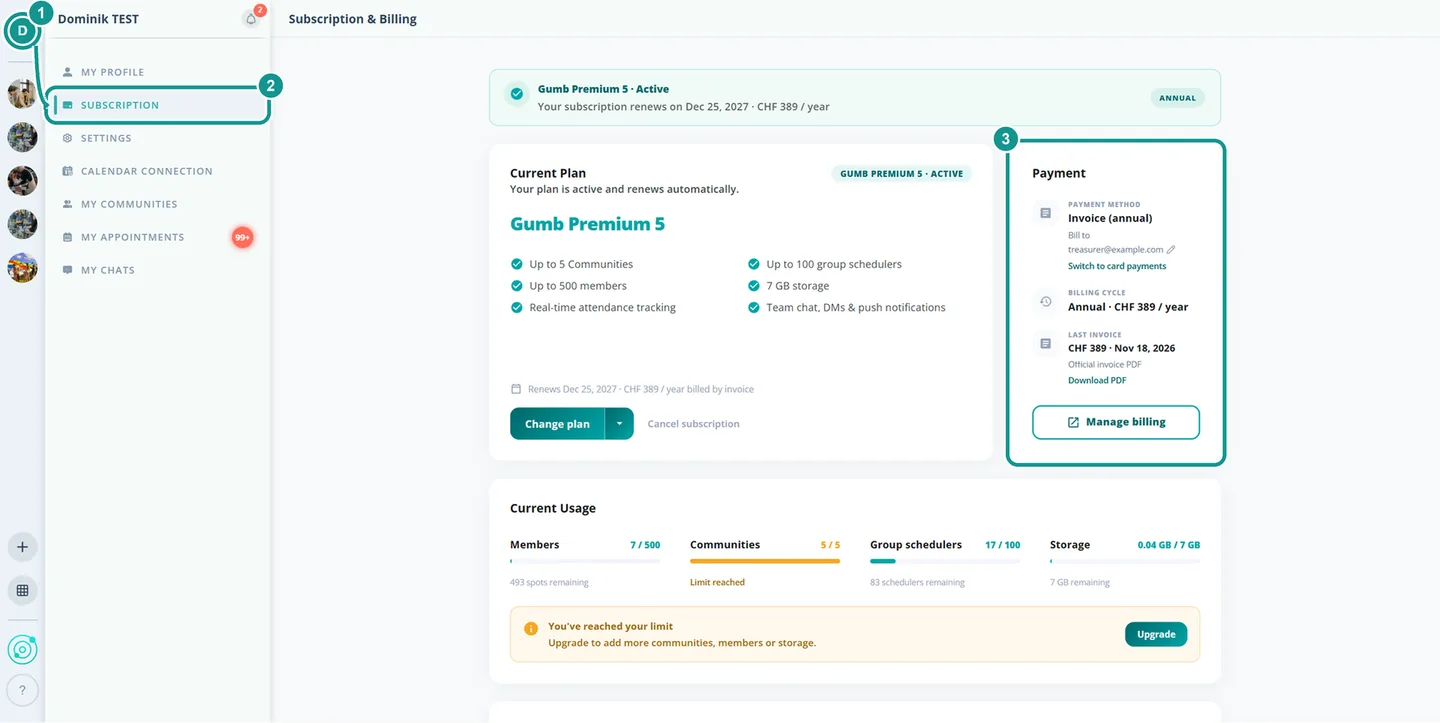
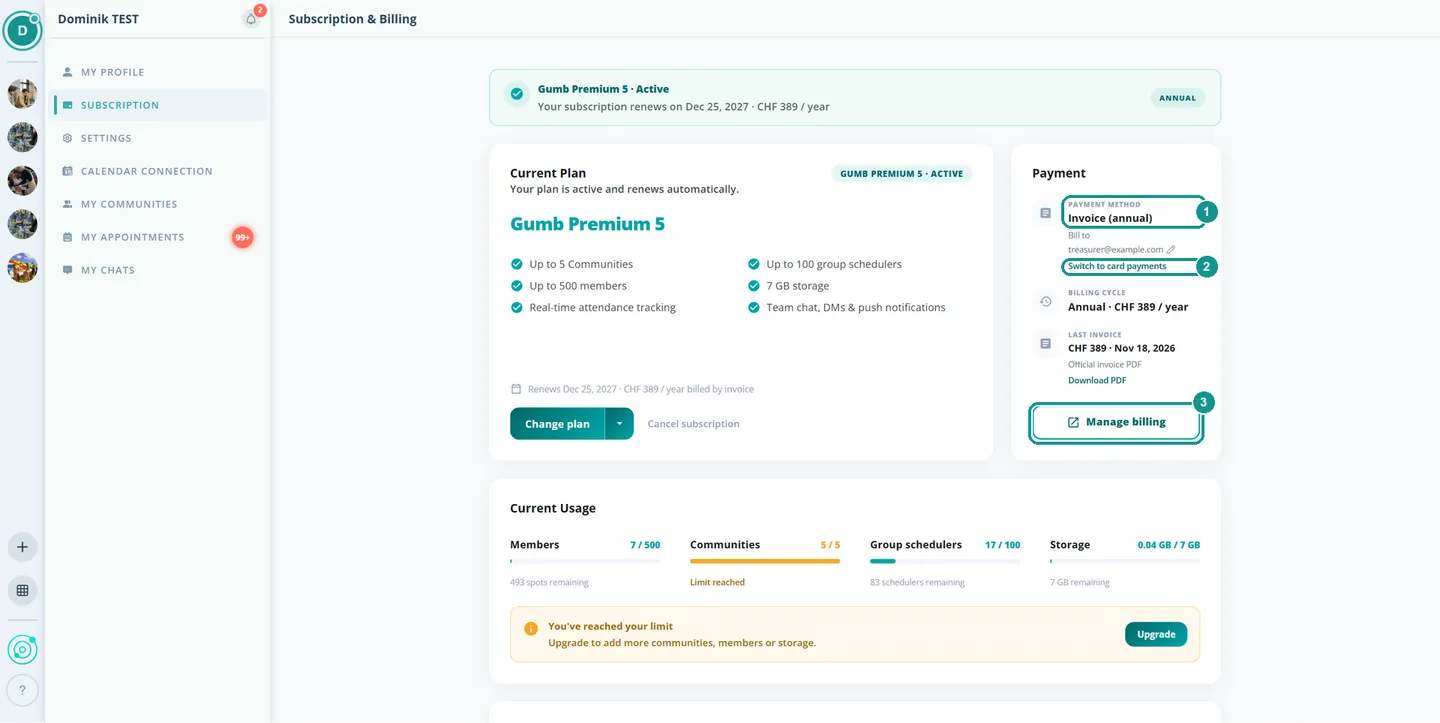
- Payment method (1): how you pay, by invoice or card for example. With invoice, you'll see who it goes to right below.
- Switch to card payments (2): moves you from invoice to card. If you pay by card, it says Switch to invoice payments here.
- Manage billing (3): opens Stripe's secure page, where you can update your card, name, email and billing address.
How do I switch from invoice to card?
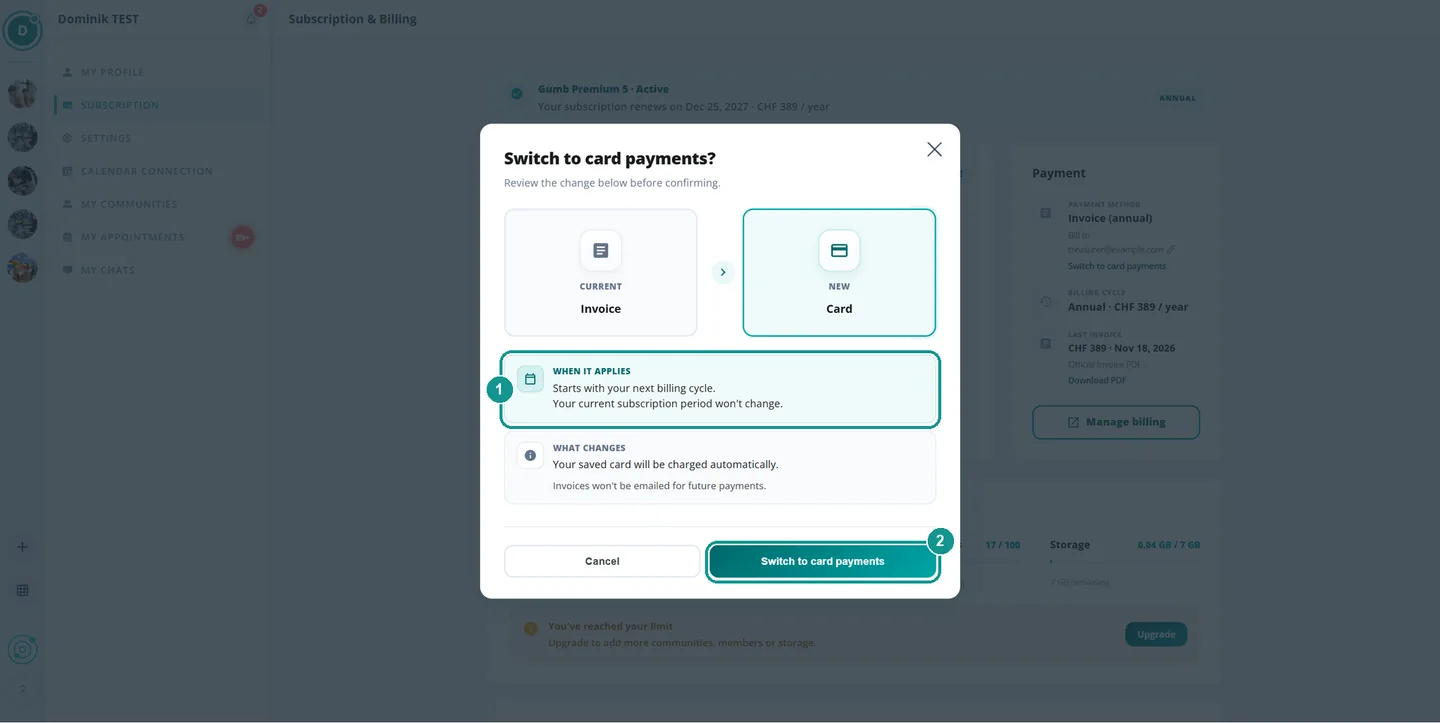
- In the Payment section, click Switch to card payments.
- When it applies (1) shows that the switch starts with your next billing cycle. Your current subscription period stays the same.
- Click Switch to card payments (2). If there's no card on file yet, you add one in the next step on Stripe's secure page.
From then on, your card is charged automatically at every renewal, and invoices are no longer emailed.
How do I switch from card to invoice?
In the Payment section, click Switch to invoice payments and confirm with Switch to invoices. From your next billing cycle, you get the invoice by email and your card is no longer charged.
How do I pay an invoice?
- In USD and EUR: click View invoice in the email and pay online through the payment link.
- In CHF: you get a QR-bill. Scan the QR code on the payment slip with your e-banking or banking app.
Every invoice is also under Subscription in Billing history. You'll find the receipt there once you've paid.
Can the invoice go straight to our treasurer?
Yes. In the Payment section, click the pencil next to Bill to, add the email addresses, such as your treasurer's, and click Save. Every recipient gets the same invoice. More: Invoices, Receipts & Recipients 📧
Is VAT charged?
No. Gumb AG isn't registered for VAT, so your invoices don't include any.
I used to pay with PayPal
Since August 2026, all payments run through Stripe, and PayPal is no longer available. We've already ended your old PayPal subscription, so there's nothing to do there. Your Gumb subscription continues at the same price, with the same term and renewal date. As the owner, you only need to add a new payment method under Profile > Subscription. We'll remind you in Gumb and by email 30 days before your renewal.
Trouble with a payment?
A payment failed or your card expired? See Payment or Subscription Issues ❓